
MOBA LEGENDS: 5V5!
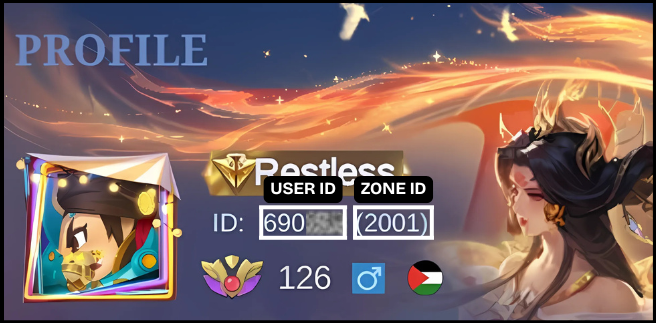
How to find MOBA LEGENDS: 5V5! Player ID?
To find your User ID, tap your profile on the top left of the main menu. It’s shown below your character name. Example: 12345678(1234).
Moba Legends:5V5!
Top up Moba Legends: 5V5! Diamonds in seconds! Just enter your USER ID & ZONE ID, select the value of Diamonds you wish to purchase, complete the payment, and the Diamonds will be added immediately to your account.
Download & play Moba Legends:5V5!
Recharge Arena supports recharges for the Official Mobile Legends: Bang Bang (Global) app and Moba Legends 5v5!. 👈 (Download Link)
⚠️ Other versions such as FT, VNG, or third-party variants are not supported for recharg
1 Enter User Details ?
2 Select Amount
Special Bundle
Purchase Special Bundle to claim great value, precious rewards!
Double Diamond on First Recharge
Players who haven’t topped up the 50/100/250/500 Double Diamond Pack on any platform can receive a Double Diamond Bonus on their first purchase. Note: This is not a first recharge benefit on Recharge Arena.
Weekly Diamond Pass
Weekly Diamond Pass offers instant Diamonds and Crystal of Aurora at the best value.
Diamonds
Normal Diamonds
Twilight Pass
Twilight Pass can only be purchased once per user account.
3 Email Address
Optional: If you would like a receipt of the purchase by email, please enter an email address
Moba Legends:5V5!
Top up Moba Legends: 5V5! Diamonds in seconds! Just enter your USER ID & ZONE ID, select the value of Diamonds you wish to purchase, complete the payment, and the Diamonds will be added immediately to your account.
Download & play Moba Legends:5V5!
Recharge Arena supports recharges for the Official Mobile Legends: Bang Bang (Global) app and Moba Legends 5v5!. 👈 (Download Link)
⚠️ Other versions such as FT, VNG, or third-party variants are not supported for recharg